


Procedure from Prior Application to Visiting the Library
Application and Visit Procedure (Steps 1–4)
- Check Material Availability
- Apply via Web Form
- Reservation Confirmation Email (Automated Delivery)
- Entering Library
- Application by phone/email is not accepted.
- Visitors without prior application are not allowed to use the Libraries.
- When you cancel your visit, please inform us.
- To reschedule your visit, please cancel the original appointment and reapply.
- If you have any symptoms of illness, please refrain from visiting us.
1.Check Material Availability
Please search the online catalog to confirm that the material you need is held at either Ookayama Library or Suzukakedai Library.
- Before applying, you need to specify a library material you use.
- If the material you need is held in a public library nearby, please visit the public library.
During the online catalog system maintenance, please use CiNii Books for material searches. For information on how to search using CiNii Books, please see the link below.
2.Apply via Web Form
Please fill in an application form exclusively for the Library which holds the material you need.
Application form (Ookayama Library)
Application form (Suzukakedai Library)
- Each person is required to submit one application per day.
- If visiting with multiple people, each individual must apply separately.
Application Period
- Applications can be submitted from 2 weeks to 2 business weekdays before your visit.
- The relationship between the visit date and the application deadline is shown in the table below. For example, you need to apply by Thursday (see the lower row) to visit on Monday (see the upper row of the table). *It may change due to public/library holidays.
Day of Visit Wed Thu Fri Sat Sun Mon Tue Wed Thu Fri Deadline Day Mon Tue Wed Thu Thu Thu Fri Mon Tue Wed
- For example, you need to apply by Monday (see the upper row) to visit on Wednesday (see the lower row of the table).
- During Golden Week (late April to early May), the Summer Holidays at the Institute, and the New Year holidays, the reservation deadline may differ from the usual schedule. Thank you for your understanding in advance.
- Visitors cannot use Ookayama library during the following periods of exams:
From Thursday, May 21, 2026 to Monday, June 8, 2026
From Wednesday, July 22, 2026 to Wednesday, August 5, 2026
From Wednesday November 18, 2026 to Tuesday, December 1, 2026
From Monday, January 25, 2027 to Sunday, February 7, 2027
Reserving Materials for Use
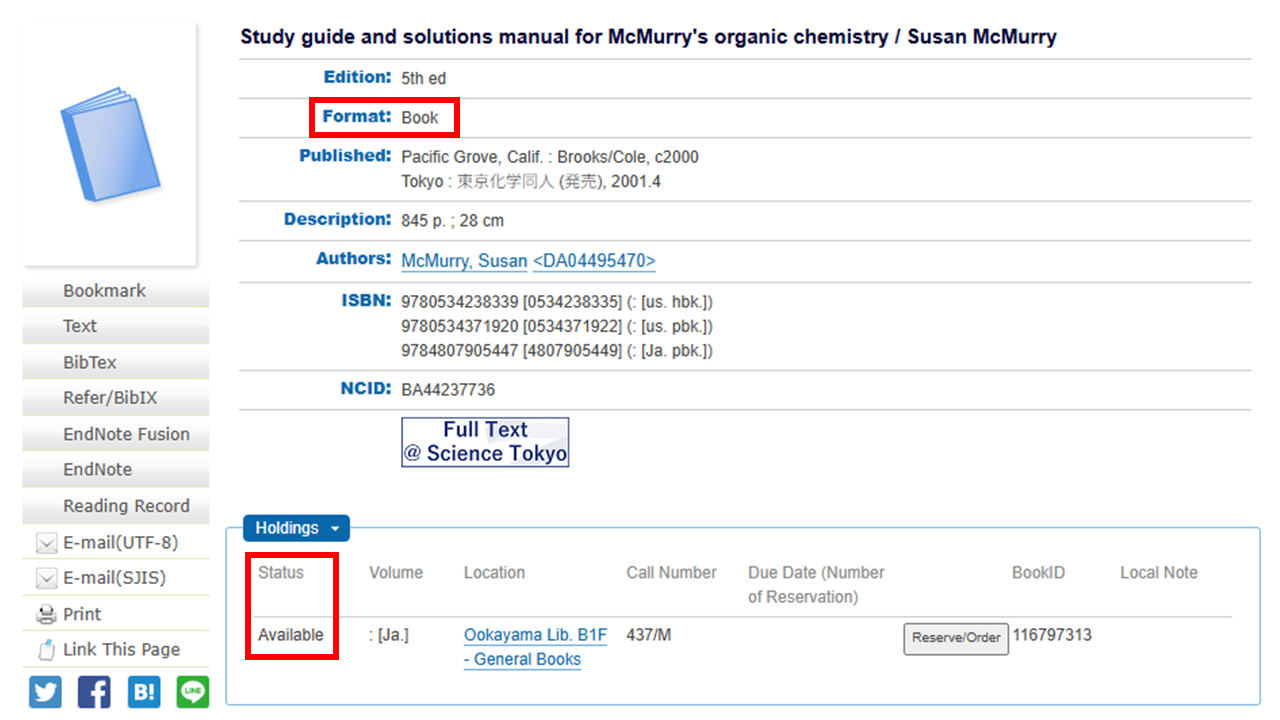
- If you wish to have materials held for you, please select “Yes” under the question “Do you need the book reserved?”
- It is applied for books whose "Format" is "Book" and whose "Status" is "Available" on the search results of the online catalog, as shown in the image below.
- If you would like to reserve more than one item, please contact us via the “Additional Notes” section of the application form.
3.Reservation Confirmation Email
Ookayama Library
After reviewing your application, we will send you a confirmation email of your reservation on the next business day.
Suzukakedai Library
Once your application is complete, you will receive an automated reservation confirmation email.
- If there are any discrepancies or if further verification is required, we may follow up with an additional email.
- If you do not receive the confirmation email, please contact us using the contact information (Ask Service) at the bottom of this page.
4.Entering Library
When you arrive at the library, you will be asked to present one of the following forms of identification at the counter.
|
Student card, Staff ID card, Residence Card, Driver's license, Passport, Individual Number Card (My Number Card), Identification issued by a public authority or equivalent |
- Entry is not permitted without prior application.
- We give you a one-day library card upon check-in at the entrance. Your library card must be visible at all times while inside the Library.
- Please be sure to give it back when leaving the library.
Contact Information
Ookayama Library / Tel:03-5734-2097(8:45 a.m. - 5 p.m. on weekdays)
Suzukakedai Library / Tel:045-924-5152(8:45 a.m. - 5 p.m. on weekdays)